Use Claude Cowork when the job ends in a document, a spreadsheet, or a recurring report. Use Claude Code when the job is technical: fixing errors, repairing a site, connecting to stores and APIs, building agents. Both run on the same agentic architecture. The job decides which one you open, not the product name.
I run both, daily, inside my own operation and my clients'. Research, analysis, planning, and workflow automation start in Cowork. When a fix isn't landing after a few rounds of back-and-forth, I move it to Claude Code, and it resolves on the first attempt more often than not. This guide breaks down where each one earns its place, what the data says about how people actually use them, and how CLAUDE.md, hooks, and routines turn either one into something you can actually run a marketing operation on.
What's the actual difference between Claude Cowork and Claude Code?
Claude Cowork and Claude Code run on the same agentic architecture, but they're built for different jobs. Cowork is for knowledge work that ends in a deliverable: a document, spreadsheet, or report. Claude Code is for technical work inside a codebase or a live site: fixing, building, and connecting systems. The tell isn't which one is "better." It's whether the job produces a file or fixes a system.
Cowork can design a web page. The difference shows up when a change isn't landing. If I'm several rounds into back-and-forth with Cowork on the same fix, I open Claude Code, and it resolves it on the first attempt. Claude Code covers more ground on technical problems. Cowork doesn't compete with it there.
What is Claude Cowork used for?
Claude Cowork is built for knowledge work: research, reporting, planning, and content that doesn't require touching a codebase. Anthropic's own framing is direct about it: Cowork brings Claude Code's agentic capabilities to knowledge work beyond coding, with no terminal required (Get started with Claude Cowork).
Sessions run in the cloud, in beta, on an isolated environment on Anthropic's servers. When a task needs a local file or your browser, Claude reaches it through the Claude Desktop app, which has to be open. Anthropic's documentation describes the isolation without naming the sandbox technology, so this guide won't guess at it either.
In my own operation, Cowork is where research, data analytics, and automated workflows for emails, product descriptions, and blog posts live. A lot of AEO and SEO planning happens here too: how a page should be structured before it's built.
Anthropic sampled 1.2 million anonymized Cowork sessions (May 11–31, 2026) and found business process and operations led every category, followed by content creation and copywriting at 16.4%. Software development was just 8.7%. (How people are using Claude Cowork, Anthropic, July 7, 2026)
The same report notes that developers reach for Claude Code, not Cowork, when they actually write code, which is the whole argument for this guide.
What is Claude Code used for?
Claude Code is Anthropic's coding agent, built for technical work inside a codebase or live site: fixing errors, running commands, connecting APIs, and building agents. It runs in the terminal, IDEs, the desktop app, and the browser on the same engine, so your CLAUDE.md files, settings, and MCP servers carry across every surface.
I use it for fixing coding errors, technical SEO repairs on live pages, and replanning work that came out wrong in Cowork or that Cowork couldn't solve on its own. I'm also using it right now to design an AI marketing operating system, more on that below.
The data on how people actually use it matches the feel of it. Anthropic's study of roughly 400,000 interactive Claude Code sessions (October 2025–April 2026) found that people make about 70% of the planning decisions and about 20% of the execution decisions. Claude does the rest. Each prompt sets off around 10 Claude actions on average (Agentic coding and persistent returns to expertise, Anthropic, June 16, 2026). You decide what to build. Claude Code works out how.
"You decide what to build. Claude Code works out how."
Subagents live here too: a subagent is a Markdown file with YAML frontmatter in .claude/agents/, running in its own context window with its own system prompt, tool access, and permissions (Create custom subagents). This is where I see people build agents and apps. I don't see people building that way in Cowork.
Claude Cowork vs Claude Code: feature-by-feature comparison
| Claude Cowork | Claude Code | |
|---|---|---|
| Where it runs | Anthropic's cloud (beta); the desktop app bridges local files and browser | Your machine; routines and cloud sessions run on Anthropic infrastructure |
| Persistent context | Global and folder instructions, projects | CLAUDE.md, rules, auto memory |
| Extending it | Connectors, skills, plugins | MCP servers, skills, plugins, hooks, subagent files |
| Recurring work | Scheduled tasks | Routines (cloud) or Desktop scheduled tasks (local) |
| Approvals | Manual or Auto | Manual, acceptEdits, plan, auto, dontAsk, bypassPermissions |
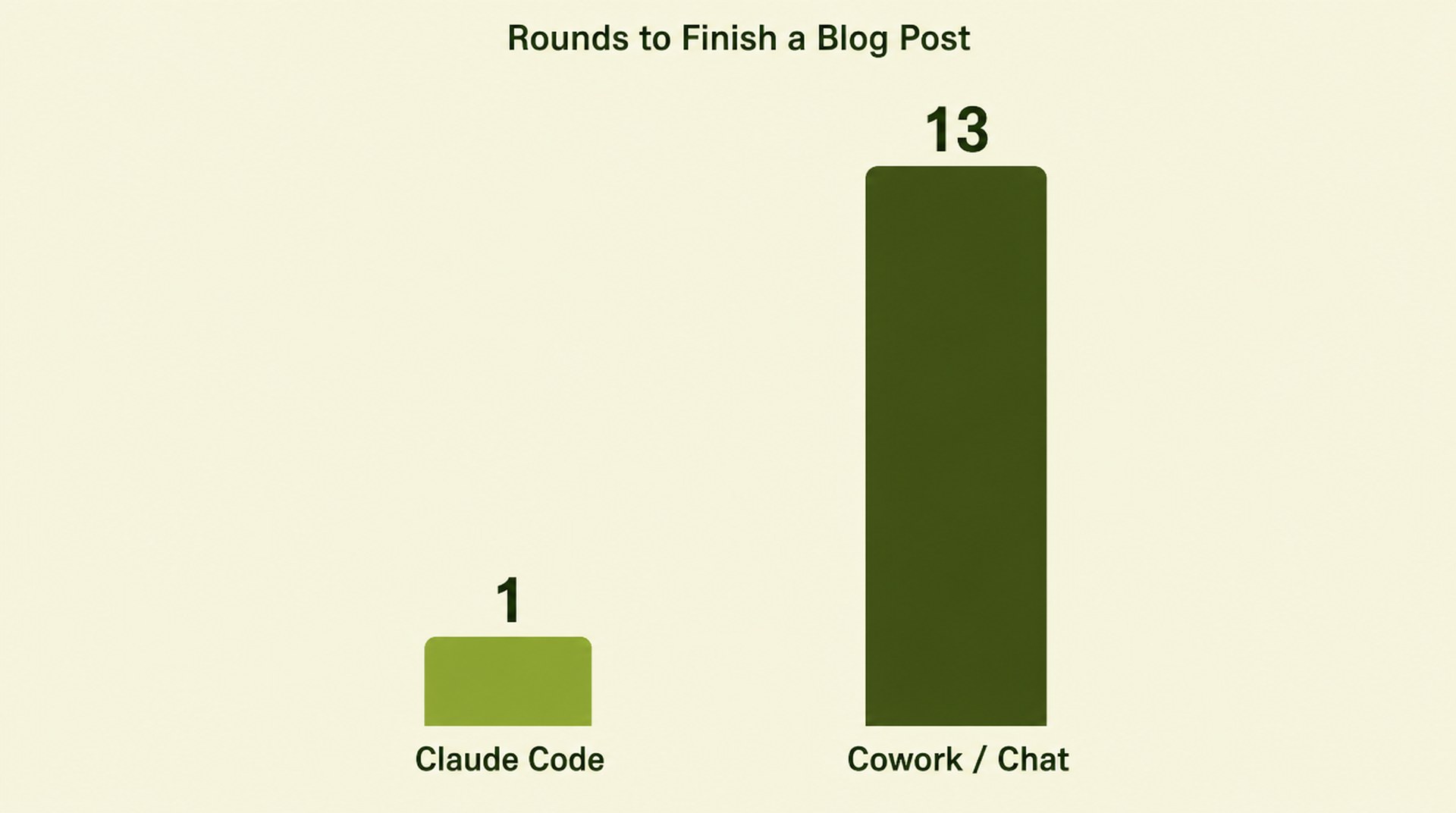
The back-and-forth gap is measurable, not anecdotal. For blog posts specifically, the median chat or Cowork conversation took 13 rounds of back-and-forth. The median Claude Code session producing the same kind of post took one human prompt. The gap held even when both surfaces ran the same model, which Anthropic says suggests the product matters more than the model (Anthropic Economic Index report: Cadences, Anthropic, June 26, 2026).
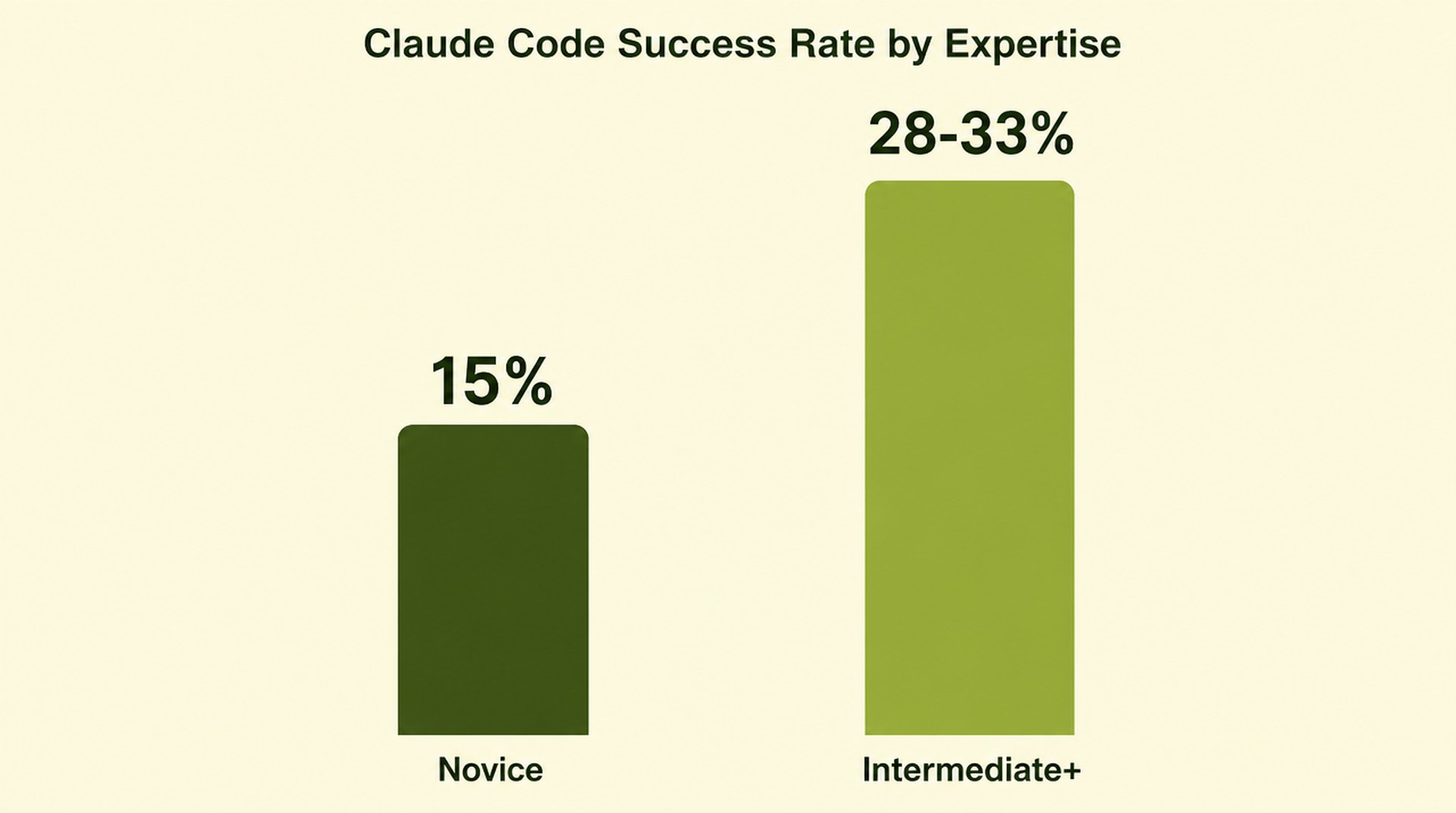
Expertise matters too. The same June 2026 Claude Code study found sessions rated as showing more domain expertise reached verified success more often, 15% for novice-rated sessions, 28-33% for intermediate and above. Writing your context down is how you bring that expertise into a session before Claude ever touches a file. Which is the entire argument for CLAUDE.md.
Why does Claude Code need a CLAUDE.md file?
Claude Code performs best when you give it context before it starts working, because it isn't self-correcting on its own. Skip that step and it improvises, which gets a lot less charming once it has shell access. A CLAUDE.md file fixes this: markdown instructions Claude reads at the start of every session.
Anthropic's memory documentation puts the project file at ./CLAUDE.md or ./.claude/CLAUDE.md, the personal file at ~/.claude/CLAUDE.md, allows @path imports up to four hops deep, offers /init to generate a starter, and recommends keeping each file under 200 lines (How Claude remembers your project).
For a marketing operation, CLAUDE.md holds who you are, what you do, where Claude should check for information, and which documents it must follow, including a brand voice document. For anything else, you still need instructions, guardrails, and a definition of done.
# Project context (EXAMPLE: placeholder content)

## Who I am
- [Your name], [your role] at [your company].
- I review every output before it ships.

## The business
- [One line: what the business sells and who it serves.]
- [Business model, main channels, current priorities.]

## Where to look
- Product data: [system or folder, for example ./data/products.csv]
- Analytics: [dashboard, export folder, or connector name]
- Approved past work: [folder of examples to match]

## Documents to follow
- Brand voice: @docs/brand-voice.md
- Style rules: @docs/style-guide.md

## Guardrails
- Ask before deleting, publishing, or sending anything.
- Save drafts to ./drafts/ and leave ./published/ untouched.
- Cite a source for every number.
- [Any topic that is off limits, for example unreleased features.]

## Parameters
- Tone: [for example, plain and direct]
- Output format: [for example, one markdown file per item]
- Definition of done: [what a finished task looks like]
What do Claude Code hooks do that CLAUDE.md can't?
Hooks enforce a rule every time, with no exceptions. CLAUDE.md only asks nicely. CLAUDE.md is context, not enforcement, and Anthropic's own documentation says compliance isn't guaranteed. Hooks are user-defined shell commands that run at lifecycle events like PreToolUse and PostToolUse. A PreToolUse hook can block an action by exiting with code 2 or returning a deny decision, and that deny holds even in bypassPermissions mode (Automate actions with hooks). If there's a rule you can't afford Claude to skip (never publish without approval, never touch a live file outside /drafts), that's the mechanism. A stronger sentence in CLAUDE.md won't do it.
How do Claude Code routines handle scheduled work?
Claude Code routines run a saved prompt on a schedule, in the cloud, independent of whether your laptop is open. A routine packages a prompt, repositories, and connectors once, and runs it on cloud infrastructure Anthropic manages. It can start from a schedule, an API call, or a GitHub event (Automate work with routines).
I've used a routine to pull raw data from my own sites and run technical research on a daily cadence. It completes whether the computer is open or closed, and when something went wrong mid-run, it corrected course and kept going.
Two things to know before building one: routines are still in research preview, with a one-hour minimum interval on the schedule. And a routine runs with no permission-mode picker: every connector on your account is included by default. Anthropic's own guidance is to trim connectors, repositories, and network access down to what the routine actually needs. Scope first, schedule second.
Do Claude Cowork scheduled tasks run without my computer on?
They're documented to, but set your guardrails before you rely on that. Cowork's scheduled tasks now run in the cloud too. If you don't want a permission prompt on every run, allow the connectors the task uses ahead of time in tool settings, or it sits waiting for approval. Anthropic's documentation says scheduled tasks run remotely, so a sleeping computer or a closed desktop app shouldn't matter. In my own experience, when my computer isn't on, my Cowork scheduled task doesn't run. I'm reporting the gap, not explaining it. Test one on your own setup before you build a workflow that depends on it.
Is Claude Cowork merging with chat?
Yes. Anthropic is merging Cowork and chat into a single experience, rolling out gradually starting with Pro and Max plans. Ask for what you need, and Claude decides whether it's a quick answer or a full task, with no mode to pick first. Enterprise admins get at least 30 days' notice before anything changes on their org, and existing tasks, projects, connectors, and skills carry over automatically (Claude Cowork and chat are one Claude, Anthropic Help Center).
If your message box still shows separate "Chat" and "Cowork" options, you haven't gotten the new experience yet, everything in this guide still applies the way it's written. One detail worth knowing if you run standing instructions the way we do at DLaurie AI: once you're migrated, the Cowork Global Instructions setting moves into Instructions for Claude under Settings > General. Check that your instructions carried over the way you expect before you assume they did.
Where this fits in an AI marketing operating system
Workflows and automations are the starting point. An AI marketing operating system connects them: shared context (the CLAUDE.md every agent reads), specialist agents with their own scope and tools, scheduled runs on a cadence, and an approval gate (nothing ships without a human decision). If you've already wired a scheduled job to an agent, you've built one piece of it.
We're using Claude Code right now to design ours at DLaurie AI: an orchestrator plus seven specialist agents, with an approval queue where nothing publishes without founder sign-off. Start with one task your team repeats every week, write its CLAUDE.md, and run it in Claude Code before you schedule it.
If your team is running Cowork and Code side by side with no system behind either one, that's the gap the AI Marketing Operating System closes: a designed architecture connecting your tools, with Claude Cowork Training for Marketing Ops bringing your team up to speed to run it. Book a discovery call to talk through your setup.
Frequently asked questions
Is Claude Cowork the same as Claude Code?
No. Both run on the same agentic architecture, but Cowork is built for knowledge work (documents, spreadsheets, reports) and Claude Code is built for technical work inside a codebase or live site.
Does Claude Cowork run without my computer being on?
Sessions run in Anthropic's cloud, but anything touching a local file or your browser needs the Claude Desktop app open. Scheduled tasks are documented to run remotely regardless of device state. Real-world results on that can be inconsistent, so test it on your own setup before depending on it.
Do I need a CLAUDE.md file to use Claude Code well?
Not strictly, but skipping it means Claude Code improvises with less context, which shows up fastest once it has shell access. A CLAUDE.md file under 200 lines with your role, guardrails, and where to look for information is the fastest way to get consistent results.
What's the difference between CLAUDE.md and hooks?
CLAUDE.md is context Claude reads and tries to follow, but compliance isn't guaranteed. Hooks are shell commands that run automatically at fixed points and can hard-block an action, even in bypass-permissions mode. Use hooks for any rule that can't have exceptions.
Can Claude Code and Claude Cowork share the same context?
Yes, when you set them up to. CLAUDE.md files, skills, and MCP connectors can be referenced from both surfaces, and Anthropic's own docs note that Cowork's global instructions and Claude Code's CLAUDE.md serve the same purpose on different surfaces: standing context Claude reads at the start of every session.
The bottom line: Claude Cowork and Claude Code aren't competing products. They're the same architecture aimed at two different jobs. Cowork handles the knowledge work that ends in a document or report. Claude Code handles the technical work that ends in a fix or a build. Give either one a CLAUDE.md, back the non-negotiables with hooks, and schedule the recurring parts with routines, and you've got the shape of an actual system, not just two chat windows.
Build the system instead of assembling it piece by piece
Want help building that system for your team instead of assembling it piece by piece? Talk to DLaurie AI about the AI Marketing Operating System: a designed architecture connecting your tools, with Claude Cowork Training for Marketing Ops bringing your team up to speed to run it.